

Cart
0
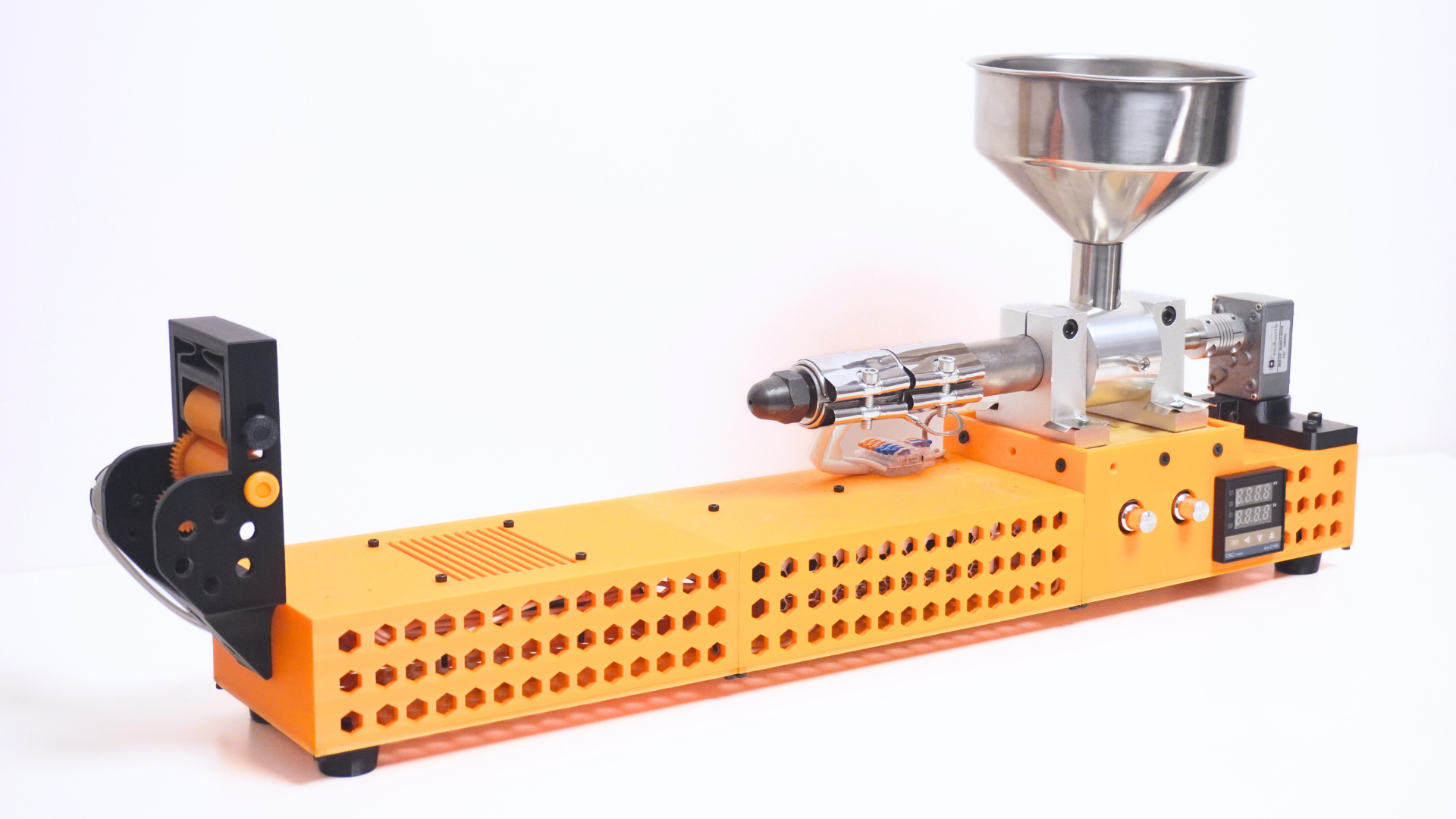
If you own a 3D printer, you already know the other side of the hobby: purge lines, support towers, failed prints, test pieces, and random scraps that slowly pile up. It’s annoying, it wastes money, and it feels even worse when you realize most of it is perfectly reusable plastic.
ExtrudeX is built to fix that problem in the most maker-friendly way possible. If you want to see the project details, pricing, and rewards, you can check the ExtrudeX Kickstarter campaign
ExtrudeX is a DIY, fully 3D-printable filament-making machine that lets you recycle your 3D printing waste into fresh, usable filament right at home—without industrial machines, without locked components, and without needing any coding.

What is ExtrudeX?
ExtrudeX is a compact filament recycler designed for regular makers and small print farms who want a practical way to reuse plastic.
The core idea is simple:
-
You shred your 3D print waste into small pieces
-
Heat the machine to your target temperature
-
Feed your material through the hopper
-
Guide the filament into the built-in puller
-
Cool it as it exits for a stable, clean output
The end result is filament you can actually load into your printer and use again.
Internal link suggestion: Link “ExtrudeX product page” to your store product page here.
Why makers want a filament recycler at home
Most people don’t waste filament because they want to. They waste it because there’s no easy loop to reuse it.
ExtrudeX is for the real-world 3D printing workflow:
-
Multicolor purge waste (“poops”)
-
Support material and brims
-
Failed prints and prototypes
-
Old scraps and partial spools that never get used
Instead of throwing it away, ExtrudeX helps you turn that waste back into value—while also making your setup more sustainable.
How ExtrudeX works (step-by-step)

Here’s the straightforward process:
-
Shred your waste into small pieces (failed prints, supports, purge lines, scraps).
-
Choose your mix:
-
Best overall results: 60% virgin pellets + 40% waste
-
You can also run 100% waste if you want (results vary by material and consistency).
-
-
Switch on ExtrudeX and set your target temperature.
-
Once heated, pour the mix into the hopper and start the DC motor using the PWM controller.
-
When filament begins to come out, grab it with pliers and guide it to the puller.
-
Turn on the puller and insert the filament between the two rollers.
-
The built-in fan cools the filament as it exits the barrel for a stable output.
If you want to watch ExtrudeX in action and support the build, here’s the Kickstarter Campaign
Optional precision upgrade: You can attach a digital gauge to the puller to see real-time filament diameter while it’s being produced.
Key features of ExtrudeX

Fully 3D-printable structure
Most of the machine’s structure is printable, so you can build it, repair it, and maintain it the maker way.
Designed for affordability
ExtrudeX is designed around accessible parts and practical engineering—not expensive “closed” systems.
Built-in filament puller
The puller helps keep extrusion consistent and usable, especially when dialed-in with the right speed.
Real-time diameter tracking (optional)
Add a digital gauge to the puller to monitor your filament diameter live while extruding.
Compact and workspace-friendly
It’s sized to fit into a normal home setup, not an industrial shop.
Minimum 3D printer requirements to print ExtrudeX parts
To print the ExtrudeX files comfortably, you should have:
-
Build volume: at least 220 × 220 × 250 mm
-
Nozzle: 0.4 mm (standard works)
-
Materials: PLA / PETG / ABS recommended
-
Reasonable dimensional accuracy for functional assemblies
What you get with ExtrudeX

-
Complete STL file pack
-
BOM with clear part names/specs
-
PDF assembly guide
-
Video guides for assembly + operation
Internal link suggestion: Link “assembly guide” to a dedicated support page, and “BOM” to a downloadable resource page.
Tips to get better recycled filament
If you want your output to look and perform better, focus on these basics:
-
Keep your input consistent in size (more uniform shredding = smoother extrusion)
-
Avoid mixing different materials (PLA with PLA, PETG with PETG, etc.)
-
Start with the 60/40 mix for reliability
-
Use the digital gauge to dial in puller speed and stabilize diameter
-
Store input material dry when possible (moisture can affect extrusion)
FAQs
Can ExtrudeX recycle multicolor purge waste?
Yes—just keep the material type the same. Color mixing will usually create a blended or darker output.
Do I need virgin pellets?
Not strictly, but a virgin mix (like 60/40) helps consistency and printability.
Is this beginner-friendly?
Yes. ExtrudeX is designed to be assembled and operated with clear guides and simple hardware.